
ZArchiver
ZDevs
Jan 24, 2012
Jun 24, 2024
7.66 MB
1.0.10
Varies with device
100,000,000+

Description
ZArchiver is a file management and archive utility app developed by ZDevs, released on May 24, 2018, for Android devices. Designed to handle compressed files efficiently, it allows users to extract, create, and manage formats like ZIP, RAR, and 7Z with a simple interface and fast performance. The app stands out for its offline functionality, wide format support, and advanced features such as archive editing and password protection, making it a practical tool for everyday file handling. If you’re looking for a reliable Android archive manager to organize and extract files seamlessly, ZArchiver is ready to use whenever you need it.
All features of ZArchiver APK
Wide Format Support
ZArchiver supports a broad range of archive formats. Users can create archives in formats like ZIP, 7Z, and TAR, while extracting even more formats such as RAR, ISO, CAB, and others. This versatility eliminates the need for multiple apps.
Easy Extraction and Compression
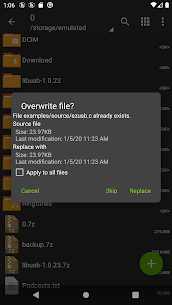
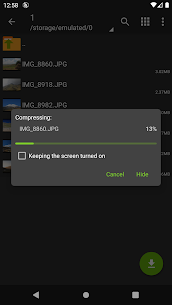
The core functionality of ZArchiver lies in its ability to quickly extract and compress files. With just a few taps, users can unpack large archives or bundle files together into a single compressed file. The app also allows partial extraction, meaning you can extract only selected files instead of the entire archive.
Password Protection and Encryption
Security is a major strength of ZArchiver. Users can create password-protected archives and open encrypted files. The app supports advanced encryption methods, helping ensure sensitive data remains protected.
Archive Editing
One standout feature is the ability to edit archives directly. Instead of extracting files, modifying them, and recompressing, users can add or remove files inside an archive without full extraction. This saves time and storage space.
Multi-Part Archive Support
ZArchiver supports split archives, which are often used for large file transfers. It can seamlessly extract files like .part1.rar or .zip.001, making it ideal for handling large downloads.
Built-in File Manager
Beyond archive handling, ZArchiver includes basic file management tools. Users can copy, move, rename, and delete files within the app. This eliminates the need for a separate file manager in many cases.
Search Functionality
The app includes a search feature that allows users to quickly locate files using keywords or filters. This is especially useful when dealing with large folders or multiple archives.
APK Installation Support
ZArchiver allows users to open and install APK files directly from archives. This feature is widely used by users who download apps manually and need a quick way to install them.
ZArchiver APK vs XAPK Installer: Key Differences Explained
| Criteria | ZArchiver | XAPK Installer |
|---|---|---|
| Primary Purpose | Archive management (compress, extract, edit files) | Dedicated installer for APK/XAPK files |
| Supported Formats | Supports many formats (ZIP, RAR, 7Z, ISO, TAR, etc.) | Focused mainly on APK & XAPK formats |
| Core Functionality | File compression, extraction, archive editing | One-tap installation of APK/XAPK packages |
| Automation Level | Mostly manual file handling and extraction | Auto-scan and automatic installation process |
| Handling OBB/Data Files | Requires manual extraction and placement | Automatically installs OBB data with XAPK packages |
| Best Use Case | Managing compressed files and archives offline | Quickly installing large apps/games with data files |
How to Use ZArchiver APK for Beginners
If you’re new to ZArchiver, getting started is simple once you understand its basic workflow. The app works like a file manager combined with archive tools.
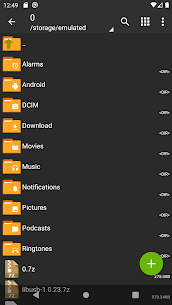
1. Navigate your files
When you open ZArchiver, you’ll see a list of folders and files on your device.
- Tap a folder to open it
- Tap “..” to go back
- Tap a file to open options like view, extract, or compress
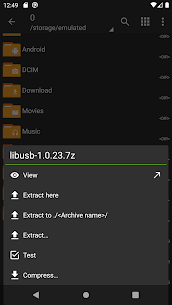
2. Extract (unzip) a file
To open a compressed file:
- Find the archive (ZIP, RAR, etc.)
- Tap it → choose:
- “Extract here” (same folder)
- “Extract to…” (choose location)
- Confirm extraction
You can also preview files before extracting them, which helps save storage
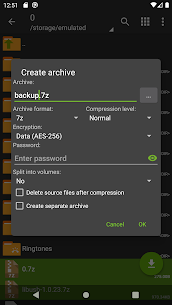
3. Create a compressed file
To compress files:
- Long-press a file or folder
- Select “Compress”
- Choose format (ZIP, 7Z, etc.)
- Confirm
This bundles multiple files into one smaller archive for easier sharing
4. Manage files easily
ZArchiver also lets you:
- Long-press files to copy, move, rename, or delete
- Select multiple files using multi-select mode
- Paste files into another folder using the clipboard button
5. Open password-protected archives
If a file is locked:
- Tap the archive
- Enter the password when prompted
- Extract as usual
ZArchiver supports encrypted archives and secure file handling
Conclusion
ZArchiver stands out as a powerful yet lightweight archive management tool for Android users. Its wide format support, offline functionality, and features like archive editing make it a reliable choice for both casual and advanced users. If you often handle compressed files or need a simple way to manage archives on your phone, ZArchiver is a practical solution.
FAQs
1. Is ZArchiver safe to use?
Yes, it works offline and does not require internet access, enhancing privacy.
2. Can I open ISO files with ZArchiver?
Yes, it supports extracting ISO and similar archive formats.
3. Can ZArchiver edit archives without extracting?
Yes, you can add or remove files directly inside an archive.
4. Can ZArchiver install APK files?
Yes, it allows you to open and install APK files directly.
What's new
- Faster extraction speed for large archives
- Enhanced support for split archive files
- Minor bug fixes and stability improvements
- Optimized file access permissions
Images
Download links
How to install ZArchiver APK?
1. Tap the downloaded ZArchiver APK file.
2. Touch install.
3. Follow the steps on the screen.