Launcher iOS 26
LuuTinh Developer
March 28, 2026
15.6 MB
8.8.1
Android 5.0+
50,000,000+

Description
Launcher iOS 26 brings an iPhone-style experience to Android with sleek design and smooth navigation. This article explores its features, performance, and customization options. Discover how this launcher transforms your device and why it continues to attract millions of users worldwide.
What is Launcher iOS 26 APK?
Launcher iOS 26 is a personalization launcher app developed by LuuTinh Developer, released on June 12, 2019, for Android devices. Designed to transform the Android experience into an iPhone-style interface, it features a sleek iOS-inspired home screen, Control Center, AssistiveTouch, and smooth animations that replicate the look and feel of modern iOS systems. With its combination of visual customization, intuitive navigation, and lightweight performance, the app stands out among Android launcher apps for users seeking both style and functionality.
What features does Launcher iOS 26 APK offer?
iOS-Style Home Screen
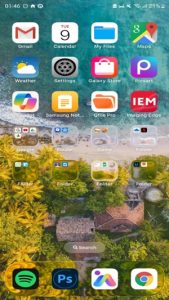
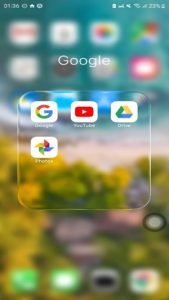
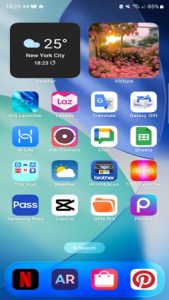
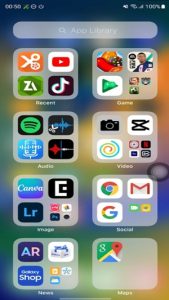
Launcher iOS 26 replaces your default Android home screen with a clean, grid-based layout similar to iPhone devices. App icons, folders, and transitions are redesigned to closely match iOS visuals. The interface feels minimal and fluid, appealing to users who prefer simplicity.
Control Center Integration
One of the standout features is the iOS-style Control Center. With a simple swipe gesture, users can access:
- Wi-Fi and Bluetooth toggles
- Brightness and volume sliders
- Quick system shortcuts
Recent updates have improved responsiveness and added smoother animations, making it feel closer to native iOS behavior.
AssistiveTouch Function
Launcher iOS 26 includes a floating AssistiveTouch button that allows quick access to frequently used actions. You can:
- Open apps instantly
- Lock your screen
- Adjust settings
This feature is especially useful for one-handed navigation and accessibility.
Advanced Visual Effects (Glass UI)
A major trend in 2025–2026 is “glassmorphism,” and this launcher integrates it well. The interface includes:
- Blur effects
- Transparent layers
- Smooth transitions
These visual upgrades enhance the premium feel and keep the launcher aligned with modern UI trends.
What is the experience like using Launcher iOS 26 APK on an Android mobile device?
- Control Experience: From my experience, the control system feels intuitive and easy to adapt to, especially with gesture-based navigation and the AssistiveTouch-style floating button. Swiping to open the Control Center or access shortcuts is smooth and responsive, making it convenient to control settings without digging through menus. This mirrors iOS behavior and reduces reliance on physical buttons, which improves one-handed usability.
- App Experience on Android Devices: Using Launcher iOS 26 on Android feels stable and generally lightweight. On most devices, transitions between screens and app launches are quick, with minimal lag thanks to performance optimization. However, based on real user feedback, occasional inconsistencies can appear, such as minor glitches in widgets or animations, especially when enabling advanced visual effects.
- User Interface Experience: The interface is where the app stands out the most. From my perspective, it closely replicates the iPhone look with polished icons, clean layouts, and modern “glass” effects. The design feels familiar and visually appealing, though in some cases, elements like icons or widgets may not perfectly match the latest iOS design. Overall, the UI delivers a refined and immersive experience that makes Android feel significantly different from its default appearance.
How to Use Launcher iOS 26 APK for Beginners
Getting started with Launcher iOS 26 is simple, but using it effectively requires a few key steps:
1. Set as Default Launcher: After installing, open the app and select it as your default home screen. This allows it to fully replace your current Android interface.
2. Explore the Home Screen Layout: Your apps will appear in an iOS-style grid. Long-press any app to move it, create folders, or rearrange your layout just like on an iPhone.
3. Use Control Center: Swipe (usually from the top or bottom depending on settings) to access Control Center, where you can quickly toggle Wi-Fi, brightness, and other essential functions .
4. Enable AssistiveTouch for Quick Actions: Turn on the floating button in settings to access shortcuts like Home, Back, or Lock screen. This feature is inspired by Apple’s AssistiveTouch, which provides on-screen controls for easier navigation .
5. Customize Your Look: Go to launcher settings to change wallpapers and adjust visual elements. Personalization is a key part of the experience, allowing you to match your style.
6. Practice Gestures and Navigation: Spend a few minutes trying swipe gestures and transitions. The launcher is designed to feel smooth and intuitive once you get used to it.
Conclusion
Launcher iOS 26 successfully bridges the gap between Android flexibility and iOS design. It’s not just a visual theme—it’s a complete transformation tool that delivers both style and functionality. With continuous updates, modern UI effects, and millions of active users, it remains one of the best choices for anyone looking to refresh their Android experience. Download Launcher iOS 26 now and turn your Android device into an iPhone-style interface in seconds.
FAQs
1. Does Launcher iOS 26 support widgets?
Yes, it includes basic widgets like clock and calendar, with more options available in updates.
2. Can I customize app icons?
Yes, you can rearrange and organize icons, but full icon pack support may be limited.
3. Is there a dark mode available?
Some themes and wallpapers allow darker visuals, depending on your setup.
4. Does it work on all Android phones?
It works on most devices running Android 5.0 or higher.
5. Will it affect battery life?
Battery impact is minimal, though visual effects may use slightly more power.
What's new
- Improved Control Center responsiveness
- Enhanced “glass” UI effects and blur animations
- Faster app opening speed
- Bug fixes for widgets and folders
- Better compatibility with Android 13–14 devices
Images