BinWiz VPN
BinWiz Team
December 2025
27.5 MB
1.2.2
Android 6.0+
5,000,000+

Description
Introduction
BinWiz VPN is a VPN and privacy tool developed by BinWiz Team, released in 2022 for Android devices. Designed for users seeking secure and unrestricted internet access, the app offers fast server connections, encrypted browsing, and the ability to bypass geo-restrictions with a simple one-tap interface. Its lightweight design and global server network make it a practical choice for everyday use, whether you’re browsing on public Wi-Fi or accessing region-locked content. If you’re looking to enhance your online privacy and explore the web without limits, you can download BinWiz VPN and get started in just a few seconds.
What are the outstanding features of BinWiz VPN?
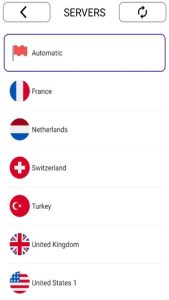
- Global Server Access: BinWiz VPN provides access to multiple server locations across different regions. This allows users to switch their virtual location easily and access websites or apps that may be restricted in their country.
- Secure Connection & Encryption: Security is a core function of any VPN, and BinWiz VPN uses encryption protocols to protect user data. This is especially useful when connecting to public Wi-Fi networks, where data interception risks are higher.
- Fast & Optimized Performance: The app claims to offer optimized servers for faster browsing and reduced lag. While speeds may vary depending on server load and location, it is designed to maintain stable connections for everyday browsing and streaming.
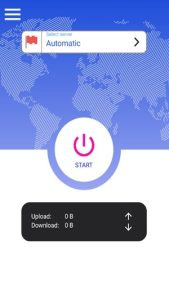
- One-Tap Connection: One of the standout features is its simplicity. Users can connect to the VPN instantly with a single tap, eliminating the need for technical configuration or advanced settings.
- Automatic Server Selection: For users who are unsure which server to choose, the app can automatically select the most suitable server based on performance and availability.
- Unlimited Usage: Unlike some free VPN services that limit bandwidth or session time, BinWiz VPN offers unlimited usage, allowing continuous browsing without interruptions.
Pros and Cons of BinWiz VPN APK
Pros
- Easy to use interface: Simple one-tap connection makes it beginner-friendly with no complex setup.
- Free with unlimited usage: No time or bandwidth limits for everyday browsing.
- Strong basic security: Encryption and IP masking help protect data, especially on public Wi-Fi.
Cons
- Data collection concerns: The app may collect and share data such as app activity, device info, and location.
- Limited transparency: No clear “no-logs” policy, and data may be used by third-party services.
- Basic feature set: Lacks advanced options like kill switch or protocol customization found in premium VPNs
- Not ideal for high-security needs: Suitable for casual use, but not for sensitive or critical activities
How to Use BinWiz VPN for Beginners
Getting started with BinWiz VPN is simple, even if you’ve never used a VPN before. Follow these basic steps to connect safely:
- Install and open the app
Download BinWiz VPN and launch it on your Android device. - Tap the connect button
On the main screen, tap the large “Connect” button. The app will automatically connect you to a suitable server. - Allow permissions (if prompted)
The app may ask for network permissions—accept them to establish a secure VPN connection. - Switch server location (optional)
If you want to access content from a specific region, choose a different server from the list. - Start browsing securely
Once connected, your traffic is encrypted and routed through a remote server, helping protect your data and bypass restrictions.
Tips for Smart Use of BinWiz VPN APK
To get the most out of BinWiz VPN while staying safe online, follow these practical tips based on real VPN security best practices:
- Always keep the app updated
Updates fix security vulnerabilities and improve performance, helping protect your data from potential exploits. - Use VPN especially on public Wi-Fi
Public networks are risky, and a VPN helps encrypt your data to prevent others from intercepting it. - Avoid relying on VPN alone for full security
A VPN does not protect against malware or phishing, so combine it with safe browsing habits and security tools. - Choose servers wisely
Connecting to the nearest or least crowded server can improve speed and stability instead of randomly selecting locations. - Prefer secure websites (HTTPS)
Even with a VPN, using HTTPS ensures your data remains encrypted between the VPN server and the website. - Limit sensitive activities on free VPNs
Free VPN apps may collect certain data, so avoid using them for highly sensitive tasks like banking. - Stay connected while browsing
For full protection, ensure the VPN remains active during your session, especially when switching networks.
Conclusion
Overall, BinWiz VPN stands out as a simple, accessible, and free VPN solution for Android users. Its ease of use, combined with essential VPN features, makes it a practical choice for everyday browsing and content access. If you’re looking for a quick and hassle-free way to secure your connection and explore global content, this app is worth trying. Download BinWiz VPN now and enjoy safer, unrestricted browsing on your Android device.
FAQs
1. Does BinWiz VPN work on all Android devices?
It works on most devices running Android 6.0 or higher.
2. Is an account required to use BinWiz VPN?
No, you can typically use the app without creating an account.
3. Can I use BinWiz VPN on public Wi-Fi?
Yes, it helps secure your connection on public networks.
4. Can I choose a specific server manually?
Yes, users can select servers or use automatic selection.
5. Does the app include encryption?
Yes, it encrypts your internet traffic for better privacy.
What's new
- Improved connection stability
- Faster server response time
- Minor bug fixes and performance improvements
- Updated server list for better global access
Images